验证软件来源
下载软件后,必须验证其确实由 GitHub CI 构建。
安装 GitHub CLI
GitHub CLI 版本需 >= 2.49.0
macOS
bash
brew install ghWindows
bash
winget install GitHub.cliLinux
bash
# Debian/Ubuntu
sudo apt install gh

# Fedora
sudo dnf install gh

# Arch Linux
sudo pacman -S github-cli
验证安装
bash
gh --version
# gh version 2.49.0 (2024-xx-xx)
登录 GitHub
首次使用需要登录:
bash
gh auth login按提示完成认证流程。
在 GitHub 上查看 Attestation
在下载并验证之前,你可以先在 GitHub 上确认软件是否有 Attestation 记录。
访问 Attestations 页面
访问 https://github.com/{org}/{repo}/attestations
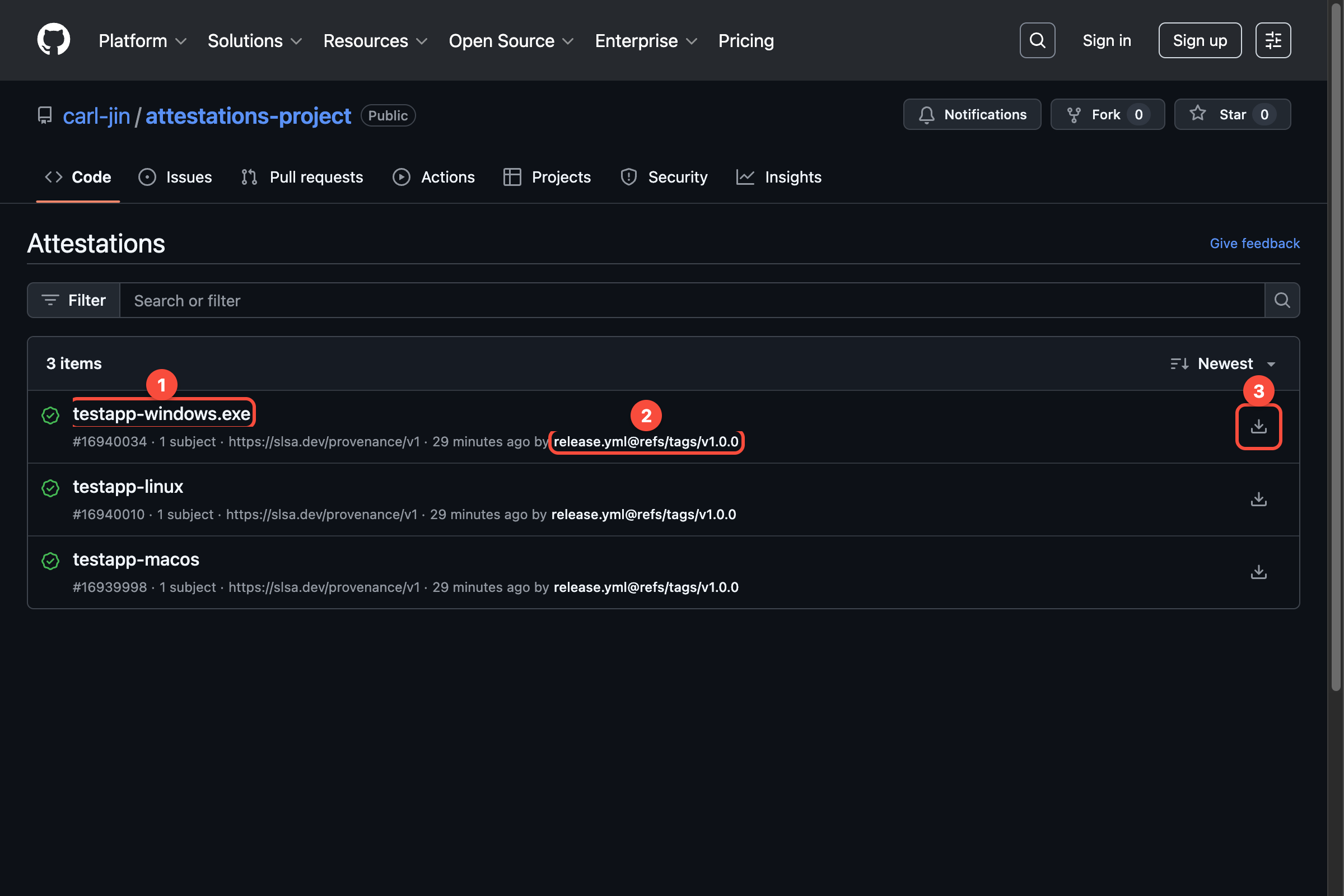
上图显示:
- 每个构建产物对应一个 attestation 记录
- 显示创建时间和来源 workflow
- 可以点击查看详情或下载 attestation 文件
查看 Attestation 详情
点击具体的 attestation 查看详细信息:
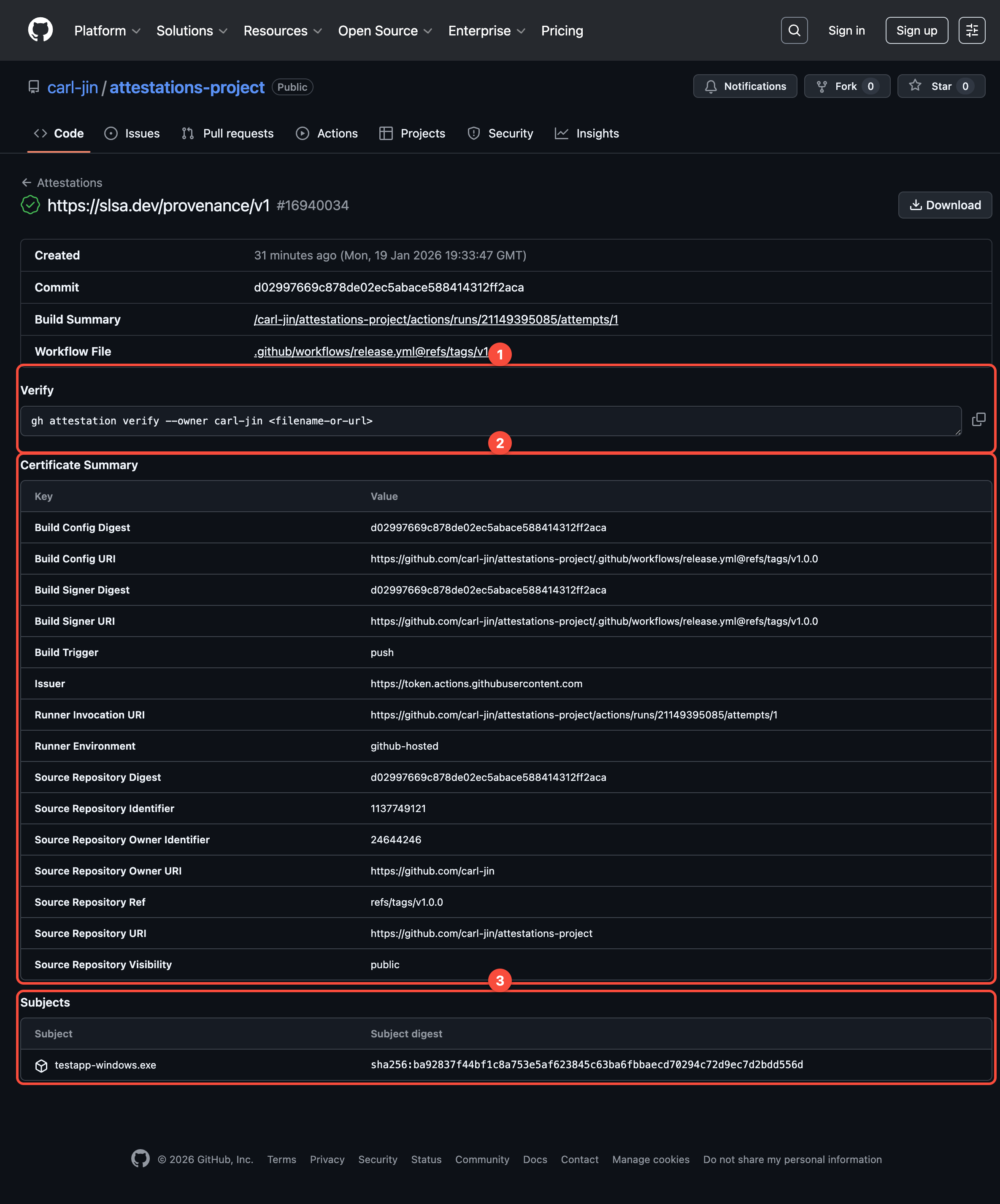
关键信息说明:
- Verify 区域 - 显示验证命令(
gh attestation verify --owner {owner} <filename>) - Certificate Summary - 证书摘要,包含 commit、workflow file、build trigger 等信息
- Subjects - 文件名和对应的 SHA256 值
验证命令
bash
gh attestation verify <文件路径> --repo <组织>/<仓库>示例
bash
gh attestation verify ./my-app.exe --repo my-company/my-app验证结果解读
✅ 验证成功
Loaded digest sha256:abc123... for file my-app.exe
Loaded 1 attestation from GitHub API
✓ Verification succeeded!

sha256:abc123... was attested by a build from:
- Repository: my-company/my-app
- Workflow: .github/workflows/release.yml
这表示:
- 文件确实由官方 CI 构建
- 文件内容未被篡改
- 可以安全使用
❌ 验证失败
✗ Verification failed

Could not find any attestations for subject sha256:xyz789...
警告
验证失败的软件 禁止使用,应立即删除并向安全团队报告。
可能的原因:
- 文件不是从官方 CI 构建
- 文件在下载后被篡改
- 软件发布时未配置 Attestation
常见问题
Q: 提示 "rate limit exceeded"
需要先登录 GitHub CLI:
bash
gh auth loginQ: 私有仓库如何验证?
确保已登录有权限访问该仓库的账号:
bash
# 检查当前登录状态
gh auth status

# 重新登录(如需要)
gh auth login
Q: 提示找不到 attestation
可能原因:
- 软件发布时未配置 Attestation - 联系开发者
- 文件被篡改 - 重新从 Releases 下载
- 版本过旧 - 旧版本可能未支持 Attestation
Q: 如何验证多个文件?
逐个验证:
bash
gh attestation verify ./file1.exe --repo org/repo
gh attestation verify ./file2.exe --repo org/repo
或使用脚本批量验证:
bash
for file in ./dist/*; do
  gh attestation verify "$file" --repo org/repo
done